5 (4)
Rating
(4)
(0)
(0)
(0)
(0)

Updated: 2026-10-18

Victor Bobrov Written by: Victor Bobrov

PDF Repair Toolbox

Guidelines for repairing damaged PDF files that cannot be opened using Adobe programs:

  1. Download, install and open the PDF Repair Toolbox from the site: https://www.repairtoolbox.com/download/PDFRepairToolboxInstall.exe.
  2. Select the damaged *.pdf file on the first page of the wizard.
  3. Specify the name of the file with the repaired data.
  4. Select the version of the saved PDF file.
  5. Click the Save file button.
pdf illustrations
pdf illustrations

How to read a damaged PDF file

PDF Repair Toolbox restores unreadable Adobe Acrobat PDF files with documents. The tool reads corrupted PDF files and saves all recovered information to a new file for Adobe Reader/Adobe Acrobat.

Main capabilities of the PDF files repair software include:

  1. Program reads and restores all PDF files versions, even those with the most complex structures.
  2. Best Adobe PDF repair tool
  3. Damaged PDF file repair tool uses a set of recovery algorithms that guarantee maximum recovery effectiveness.
  4. Tool finds and restores non-linked pages in the corrupted files.
  5. Program scans pages for links to media objects not shown in the document due to corruption or deletion from the file.
  6. Using special algorithms, the online PDF file repair software repairs known errors in PDF file editors.
  7. Supports saving to compressed and uncompressed PDF files.

Requirements

  1. Windows 98/Me/2000/XP/Vista/7/8/10/11 or
  2. Windows Server 2003/2008/2012/2016 and above
Note:
  • Unlike open source programs and freeware tools, RepairToolbox.com issues its data recovery tools under its own proprietary license, not GNU General Public License (GPL) or similar one. Freeware version of PDF Repair Toolbox is distributed without additional restrictions, but you should donate to the RepairToolbox.com community and start repairing PDF files without additional limitations.
  • Our software do not recover password protected PDF files.
  • Our tool do not repair encrypted PDF files.

Buying PDF Repair Toolbox

Personal License $25

For personal use for noncommercial purposes

Business License $39

For legal use in enterprise, commercial and governmental environments

Site License $49

For using on several computers of the customer (up to 100 electronic devices) in one building or distributed between several buildings

Cost of online file recovery

paypro

PayPro Global (PayPro Global, Inc., 250 The East Mall street, Etobicoke, ON Canada, M9B 0A9) is the fastest growing eCommerce company that develops customized solutions to help software producers to easily and effectively sell software online. PayPro Global supports more than one hundred currencies, all major credit cards, and a wide variety of payment options. PayPro Global offers efficient customer support 24/7 and provides personal attention to customers having special requirements.

How it Works?

  1. Download software from website.Download

  2. Start Install software:

    1. Press on downloaded installation file in browser
    2. Select a downloaded installation file in Windows Explorer and press Enter or double click on it.
  3. Please confirm warning message.

    openfile pdf
  4. Run installation wizard.

  5. Run program:

    1. Double click on icon on desktop
    2. or
    3. Select from main menu: Start | Programs | PDF Repair Toolbox | PDF Repair Toolbox.
    start pdf
  6. Please select or enter the file name to recover.
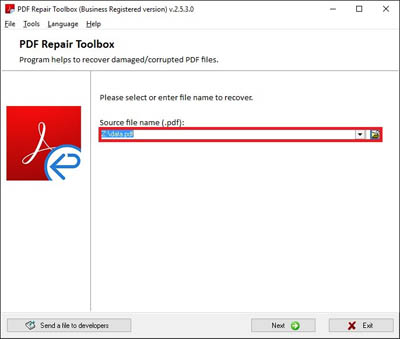
    select file
  7. Press Next button.

    next button pdf
  8. Please confirm a start of recovery process.

    confirm
  9. Program will read and analyze a damaged file a several minutes.

  10. Please select output file name.

    output file pdf
  11. Please select output PDF file version.
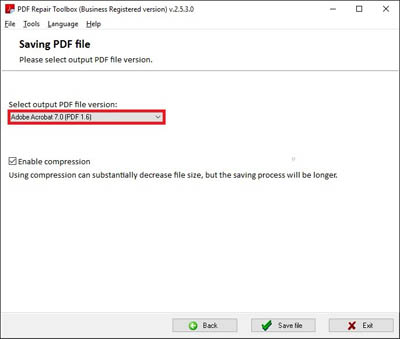
    file version pdf
  12. Press Save file button.

    save file pdf
  13. On the last page, you will find a detailed log of the recovery process.

    log pdf

Errors

With PDF Repair Toolbox you can fix next errors:

  • There was an error opening this document. The root object is missing or invalid.
  • An error exists on this page. Acrobat may not display the page correctly. Please contact the person who has created the PDF document to correct the problem.
  • There was an error opening this document. There was problem reading this document.
  • There was an error opening this document. The file is damaged and could not be repaired.
  • There was an error processing a page. Invalid Function resource.
  • There was an error processing the page. A font contains a bad cmap-encoding.
  • There was an error processing a page. Too few operands.
  • An unrecognized token "" found.
  • File is corrupt or damaged
  • This file contains information not understood by the viewer.
  • File does not begin with %PDF.
  • PDF file is not readable with Acrobat Reader.
  • Format error: not a pdf or corrupted.
  • File Damaged and Cannot Be Repaired
  • Error Locating Object Handler When Downloading a .pdf File

Screenshots

Selecting a source PDF file for further processing
Select name of new PDF file for saving
Select version of new PDF file
Viewing the final recovery report

Video Manual

Real customer reviews from TrustPilot

Victor G. Bobrov, Senior Software Engineer.

MCSD, MCDBA

An expert in data structures, data storage, and file recovery with over 20 years of experience.

Customer's reviews and ratings

nice udea

rami mehdawi 11-29-2025

I tried to repair a large, severely corrupted PDF file using 6 different programs on 3 different operating systems and none of them worked except PDF Repair Toolbox! Not only that, it was fast and the output file was perfect. Buy it!

John 10-17-2023

The program fully justified the purchase.

Victoria 09-06-2023

I had a thumbdrive with important pdf file that no other service could repair / recover. Repairtoolbox.com fixed it online for $10 - easy, quick & cost effective.

Jim Schoen